15 Best Planting Calendar Apps in 2026: Never Miss a Sowing Date Again
I once transplanted tomatoes outside three weeks too early. A late frost hit that same night, and I watched a whole seed-starting effort turn black and limp by morning. That mistake is exactly why planting calendar apps exist, and why I now trust software over guesswork.
If you have ever stared at a seed packet wondering whether “plant after last frost” actually applies to your backyard, this guide is for you.
Below are the 15 best planting calendar apps available right now, tested against what actually matters: location accuracy, crop-specific timing, and whether the app respects your setup instead of guessing blindly.
Why a Planting Calendar App Actually Matters
Seed packets give generic advice. They cannot know your frost dates, your microclimate, or whether you garden in raised beds versus open ground. That gap is where timing mistakes happen, and mine was not a small one.
The stakes are bigger than a ruined tomato plant too. Gardening has become a massive part of American life. According to the National Gardening Survey, roughly 80% of U.S. households took part in some lawn or garden activity in a recent year, with total spending reaching $79.0 billion in the most recent annual report.
Timing precision has also gotten more complicated recently. The USDA updated its Plant Hardiness Zone Map in November 2023, using 30 years of data from 13,412 weather stations, up from roughly 8,000 in the prior version. That update shifted about 49% of the contiguous United States to a warmer half-zone.
In plain terms: the zone your parents gardened by might no longer match your actual climate. An app that pulls current, location-specific data solves a problem that static charts cannot.
What Separates a Good Planting Calendar App From a Generic One
Before ranking anything, it helps to know what actually makes a planting calendar reliable.
- Location precision. Basic apps use your USDA hardiness zone, which groups you with millions of gardeners across a huge area. Better apps use your actual frost dates.
- Setup awareness. Whether you start seeds under grow lights, use raised beds, or garden in containers can shift sowing dates by weeks. Most generic calendars ignore this completely.
- Crop-specific intelligence. Tomatoes and lettuce have entirely different temperature needs, and a serious app treats them differently.
- Offline and sync support. A calendar you cannot check in the garden, where signal is often weak, loses half its usefulness.
With that framework in mind, here is the full list.
1. Seedtime
Best for: gardeners who want guided, educational timing.
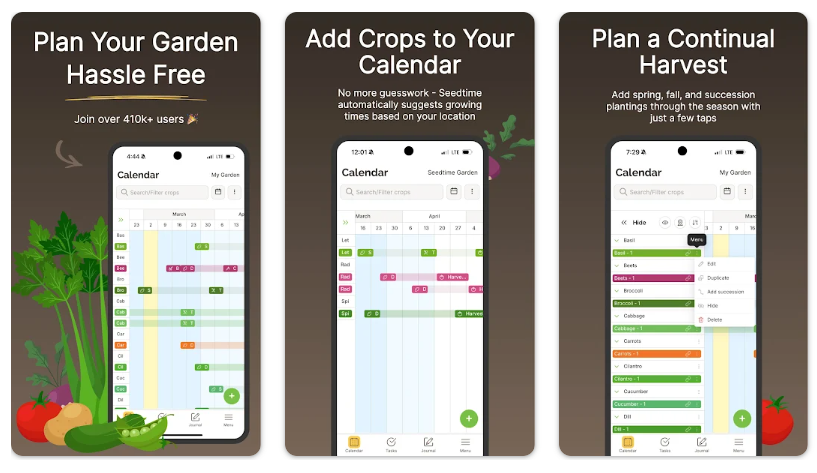
Seedtime asks for your location and chosen crops, then generates a calendar showing when to start seeds indoors, direct sow, and transplant. The dates rely on your specific frost dates rather than a broad hardiness zone, which already puts it ahead of static charts.
What I like most is the educational layer. Video masterclasses walk you through each stage of seed starting, which matters if you are still learning the “why” behind the dates. The built-in Sprout Bot assistant also answers gardening questions without leaving the app.
Task management syncs directly with the calendar, so completed steps do not just disappear into a to-do list you forget to check.
2. GrowVeg Garden Planner
Best for: gardeners who want their calendar tied to a visual layout.
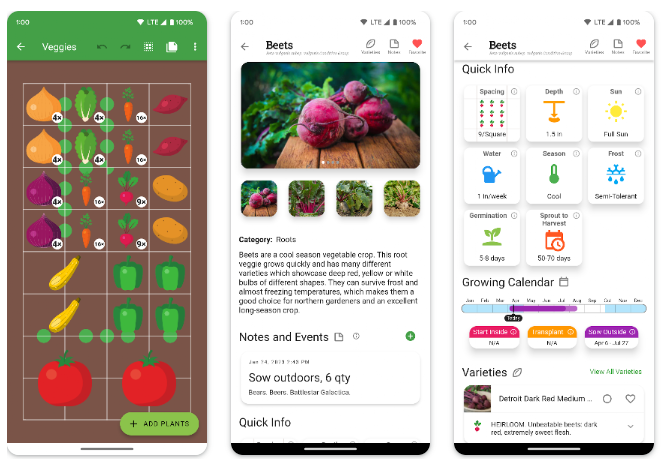
GrowVeg started as a garden design tool, and the planting calendar reflects that heritage. When you place a tomato in your digital bed layout, the calendar automatically updates with sowing and transplant dates for that specific plant.
The companion planting warnings add real context that a standalone calendar cannot offer. If you place two incompatible crops next to each other, GrowVeg tells you before you make the mistake in real soil.
The tradeoff is cost. It runs on a 7-day free trial, then $35 to $50 per year, and you are paying largely for the layout tool, with the calendar as a bonus feature rather than the main product.
3. The Old Farmer’s Almanac Garden Planner
Best for: gardeners who trust generations of published data.
The Old Farmer’s Almanac has published planting guidance since long before smartphones existed, and its digital calendar carries that legacy forward. Enter your postcode or city, and it generates a month-by-month schedule for common vegetables and herbs.
The free online version requires no account at all, which is refreshing in an industry full of forced sign-ups. Dates are calculated using your local last spring frost and first fall frost dates, matched to the nearest weather station data.
For gardeners who want the paid planner experience, subscriptions run around $50 per year after a short free trial, adding layout tools and moon-phase planting options.
4. Planter
Best for: mobile-first square foot gardening.
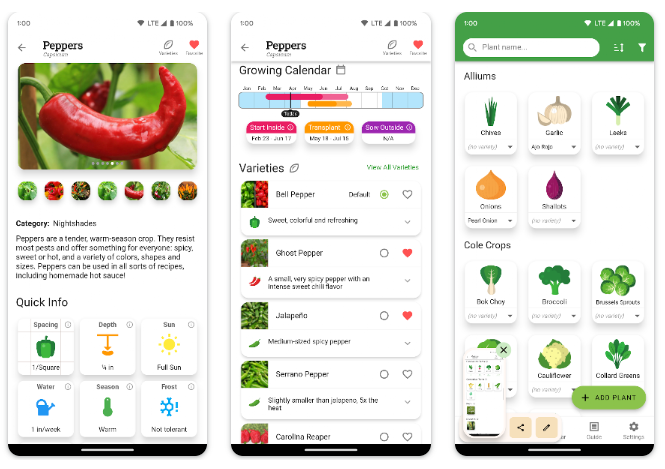
Planter was built specifically for phones, and it shows. Most garden planning tools feel cramped on a small screen because they were designed for desktop use first. Planter avoids that problem entirely.
The app automatically determines your frost date and planting zone, then builds a calendar around it. A useful “seed box” feature tracks what seeds you already own, so you stop buying duplicates every spring, which I have personally done more than once.
Companion and combative plant information appears directly as you build your layout, flagging conflicts like planting onions too close to beans before you commit to the arrangement.
5. Garden.gg
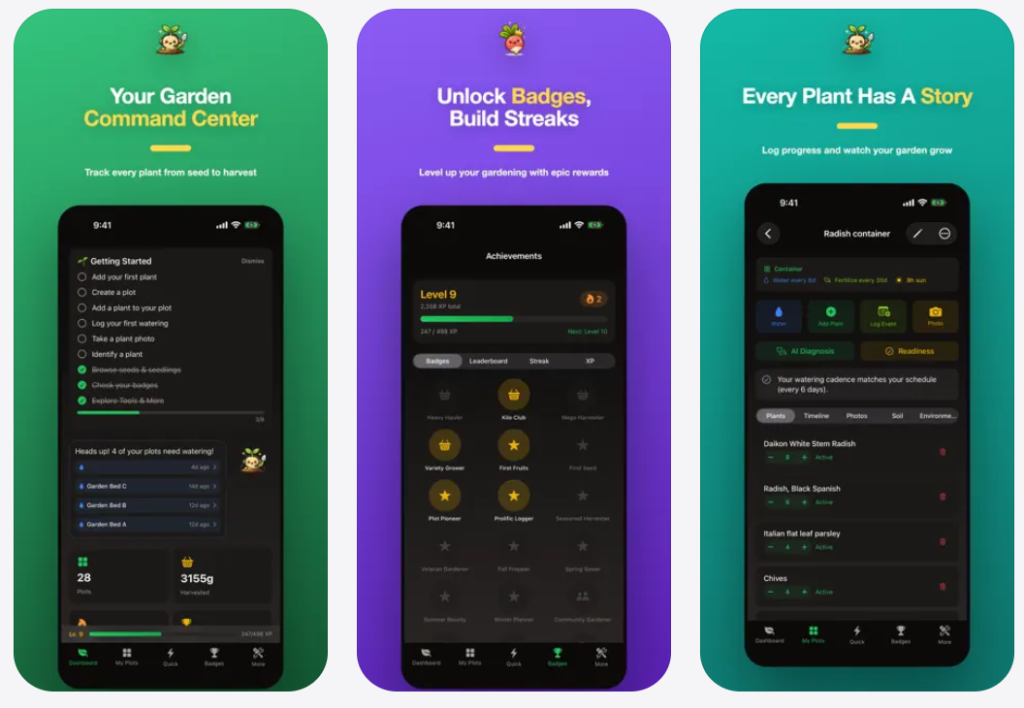
Best for: growers who want a completely free all-in-one option.
Garden.gg combines identification, watering reminders, disease diagnosis, and a planting calendar in a single free tier, which is rare in an industry that gates almost everything behind a paywall. The calendar accounts for local rain patterns, so you are not nagged to water the day after a storm.
It works across web, iOS, and Android with synced data, meaning you are not locked into checking one specific device. For vegetable, fruit, and herb growers specifically, it also logs each harvest by weight and photo, letting you track which varieties are actually worth replanting.
Two free identifications and two free diagnoses per day round out the package without requiring a subscription for basic planning.
6. Leaftide
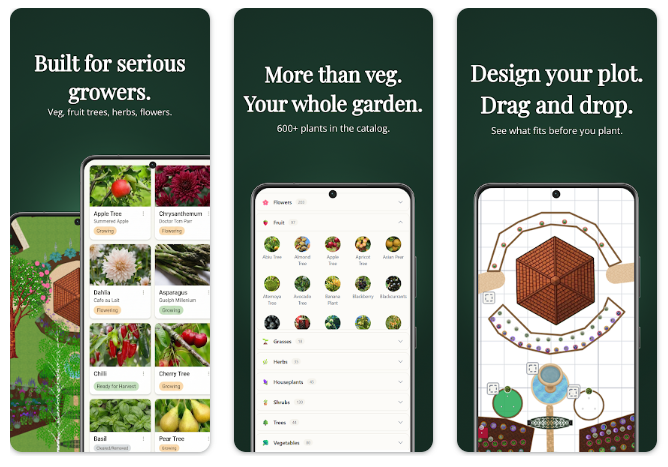
Best for: gardeners who grow fruit trees, berries, and vegetables together.
Leaftide stands out because it treats perennials, fruit trees, and annual vegetables within one system, tracking each according to its own timeline. Most calendar apps are built exclusively around annual vegetables and treat everything else as an afterthought.
Its own comparison testing found that many competing apps still rely on broad climate zones rather than precise local data, a gap Leaftide tries to close by weighting frost dates more heavily.
If your garden includes an apple tree, raspberry canes, and a vegetable bed all in the same yard, this is one of the few apps built to track all three properly.
7. Gardenize
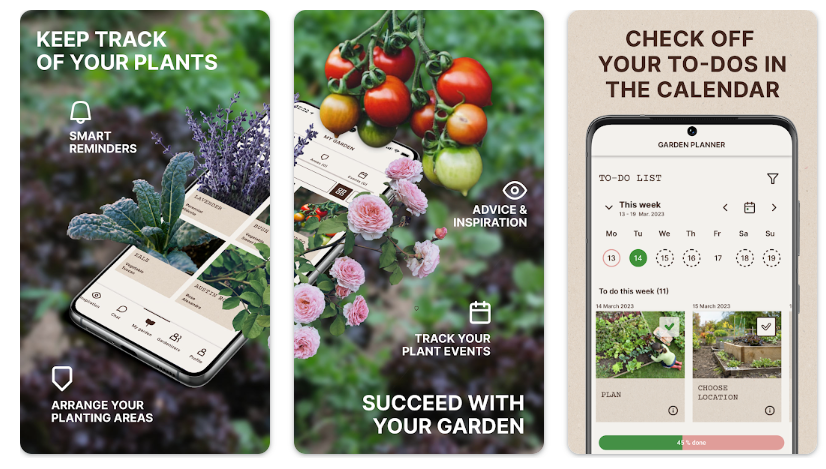
Best for: a photo-first garden journal with light calendar support.
Gardenize takes a different approach than most apps on this list. Instead of leading with scheduling, it functions primarily as a visual journal, letting you build a photo-based diary for each plant you grow.
Calendar and task features exist, but they are secondary to the documentation experience. If your priority is watching how a specific rose bush changes across three growing seasons through photos, Gardenize does this better than pure planning tools.
Pricing stays approachable too, with a limited free tier and roughly $12 per year for the expanded Plus version.
8. Smart Gardener
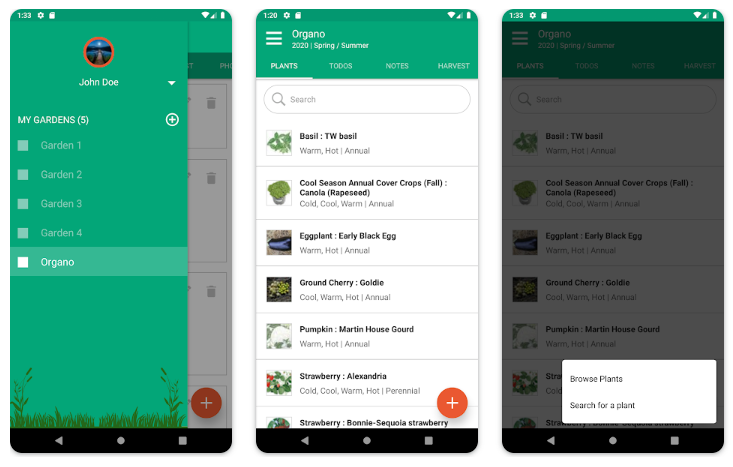
Best for: detailed, education-forward vegetable planning.
Smart Gardener has built a reputation among long-time vegetable gardeners as one of the more thorough planning tools available. It combines a personalized calendar with detailed plant information rather than treating scheduling as a bolt-on feature.
Independent app comparisons have consistently ranked it near the top for vegetable-specific planning, particularly for gardeners who want depth over simplicity.
9. Seed to Spoon
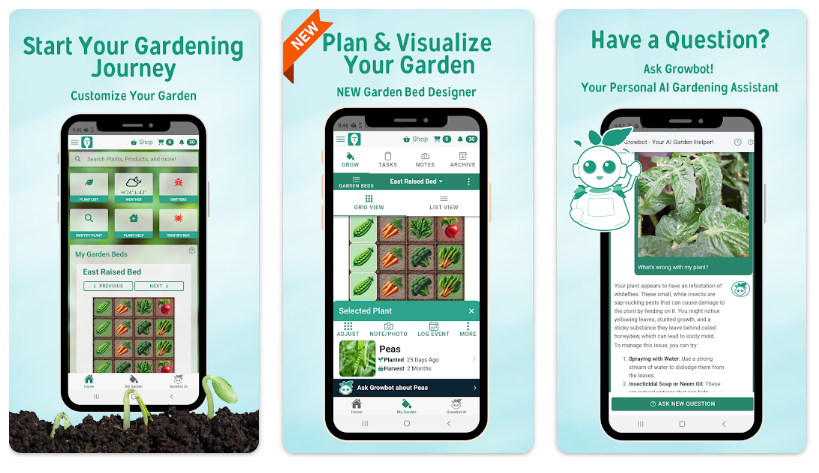
Best for: beginners who want step-by-step guidance alongside their calendar.
Seed to Spoon combines a visual layout tool with a color-coded calendar that shows exactly when to start each plant indoors or outdoors, based on your specific location. The interface leans toward newer gardeners who want hand-holding rather than a blank spreadsheet.
An in-app assistant helps troubleshoot problems as they come up, and the app calculates planting dates automatically once your location is set. Users have noted occasional glitches with photo logging, but the core calendar function remains a consistent strength.
10. Garden.org Planting Calendar (National Gardening Association)
Best for: a free, no-frills, research-backed option.
Garden.org, run by the National Gardening Association, offers a free planting calendar tool that calculates dates from your local last spring frost and first fall frost, matched to the nearest weather station. No app download or account is required to use the basic version.
The National Gardening Association has conducted its annual survey since 1973, giving it one of the longest track records of any organization tracking American gardening behavior. That institutional history lends real credibility to its planting data.
It will not win design awards, but for gardeners who just want accurate dates for tomatoes, peppers, and lettuce without extra features, it does the job cleanly.
11. BioGarden365
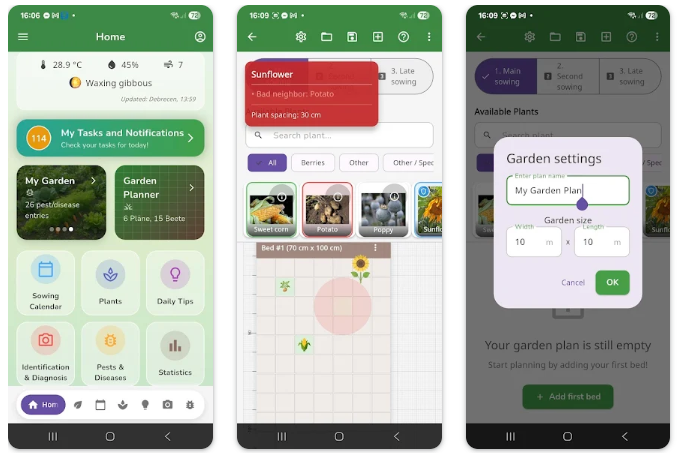
Best for: biointensive and organic gardeners.
BioGarden365 goes beyond simple sowing dates. It also schedules bio-tasks like sifting compost, preparing nettle tea sprays, and setting out pest traps, tying every task to your specific plant choices in the visual planner.
When you drop a plant into your digital bed, the app automatically generates all the associated calendar events for that variety, including timing tailored to whether it is an early or late-season type. This depth makes it particularly useful for gardeners practicing organic or low-input methods.
12. Veggie Garden Planter
Best for: a simple, affordable mobile planner.
Veggie Garden Planter keeps things straightforward. You add vegetables to a personal list, and the app builds a calendar of when to start seeds, plant, and expect harvests. It costs a small one-time fee rather than a subscription, which some gardeners prefer.
Each plant profile also lists companion and combative neighbors, helping you avoid planting conflicts before they cost you a season’s harvest.
13. Gardena
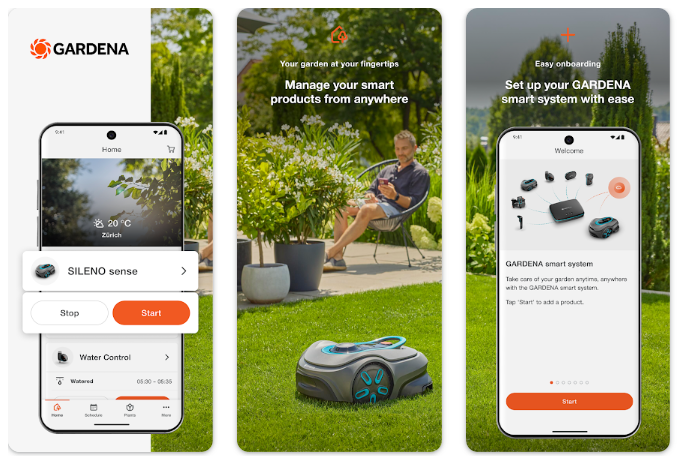
Best for: quick visual placement without an account.
Gardena focuses more on hardscaping and plant placement visuals than deep calendar precision, but it remains genuinely useful for gardeners who want to sketch out a layout without downloading anything or creating a login. You simply start clicking and building.
It pairs well with a dedicated calendar app if timing precision matters more to you than layout visuals.
14. PlantIn Garden Calendar
Best for: beginners who want reminders alongside identification.
PlantIn is best known for plant identification, but it also includes zone-based calendar reminders for care tasks. Combined with its disease diagnosis and expert-approved advice, it functions as a gentler entry point for people newer to structured garden planning.
It will not replace a dedicated planting calendar for serious vegetable growers, but paired with another tool on this list, it fills reminder gaps nicely.
15. NC State Extension Garden Planting Calendars
Best for: research-grade regional accuracy backed by a university.
This one is not a downloadable app, but it deserves a place on this list because of its scientific rigor. NC State Extension, part of North Carolina State University’s Cooperative Extension program, publishes detailed regional planting calendars for vegetables, fruits, and herbs.
These calendars specify planting windows down to the month, cross-referenced with recommendations from Clemson, the University of Georgia, Virginia Tech, and Cornell University. For US-based gardeners who want a free, printable, university-verified reference to check their app-generated dates against, this is about as authoritative as it gets.
Quick Comparison Table
| App | Best For | Price | Offline Support |
| Seedtime | Guided learning | Free / paid tiers | Limited |
| GrowVeg | Visual layout + calendar | $35–$50/yr | No |
| Old Farmer’s Almanac | Trusted historical data | Free / ~$50/yr | No |
| Planter | Mobile-first planning | Free / premium | No |
| Garden.gg | All-in-one free tool | Free | Partial |
| Leaftide | Mixed orchards and beds | Paid | No |
| Gardenize | Photo journaling | Free / ~$12/yr | No |
| Smart Gardener | Detailed vegetable planning | Paid | No |
| Seed to Spoon | Beginner guidance | Free / premium | No |
| Garden.org | Free research-backed dates | Free | No |
| BioGarden365 | Biointensive gardening | Paid | No |
| Veggie Garden Planter | Simple mobile planning | One-time fee | No |
| Gardena | Quick visual sketching | Free | No |
| PlantIn | ID plus reminders | Freemium | No |
| NC State Extension | University-verified reference | Free | Yes (printable) |
Understanding Frost Dates vs. Hardiness Zones
This distinction trips up a lot of gardeners, myself included when I first started.
Your USDA hardiness zone tells you the coldest temperature your area typically reaches in winter. It matters most for perennials, trees, and shrubs that need to survive year after year.
Your frost dates tell you when it is safe to plant tender annuals like tomatoes and peppers. This is the number that actually determines your planting calendar for vegetables.
The USDA’s own research agency notes that approximately 80 million American gardeners and growers rely on the Plant Hardiness Zone Map, but for annual vegetable timing specifically, frost dates matter more directly. A good app uses both, but weighs frost data heavily for anything you are not trying to overwinter.
Microclimates Can Break Even a Good Calendar
No app, however precise, accounts for every quirk of your specific yard. A south-facing wall, a low-lying frost pocket, or a sheltered courtyard can shift your effective planting window by half a zone or more, according to horticultural researchers.
I learned this the hard way with a raised bed against a brick wall that warmed up nearly two weeks earlier than the rest of my garden. The app was not wrong. My yard just had its own personality.
Treat every app-generated date as a strong starting point, then adjust based on what you observe in your own space over a season or two.
How to Choose the Right App for You
Think about what actually frustrates you most before downloading everything on this list.
- Want guided education alongside dates? Choose Seedtime.
- Already planning a full garden layout? GrowVeg or the Almanac’s paid planner fit better.
- Want everything free with zero subscription? Garden.org or Garden.gg cover the basics well.
- Growing fruit trees and vegetables together? Leaftide is built specifically for that mix.
- Want a university-verified reference to double-check your app? Bookmark NC State Extension’s regional calendars.
Frequently Asked Questions
Are planting calendar apps actually more accurate than seed packets? Generally yes, when the app uses your specific frost dates rather than a generic zone. Seed packets are written for an entire hardiness zone spanning huge geographic areas.
Do I need to know my USDA zone before using these apps? No. Most apps calculate your zone and frost dates automatically once you enter your zip code or city, pulling from the same data the USDA itself uses.
How often does the USDA update its hardiness zone map? Major updates happened in 1990, 2012, and 2023. The current map uses climate data from 1991 to 2020 across more than 13,000 weather stations.
Can these apps account for raised beds or containers? A few, including GrowVeg and Leaftide, factor in growing setup. Most generic calendar apps do not, so adjust dates earlier for raised beds, which warm faster than in-ground soil.
Is a free planting calendar app good enough, or should I pay? Free tools like Garden.org and Garden.gg cover core scheduling well. Paid apps add layout design, companion planting alerts, and journaling, which matter more as your garden grows in complexity.
Final Thoughts
I no longer trust a seed packet alone, and honestly, I do not think you should either. The gap between “generally safe to plant” and “safe to plant in your specific yard” is exactly where good apps earn their keep.
If I had to pick just one, I would start with Garden.org for free, research-backed dates, then add Seedtime or GrowVeg once my garden outgrew a simple checklist. Cross-check anything critical against your NC State Extension or local university calendar, especially in a year with unusual weather.
Try two or three from this list based on what frustrates you most right now. Your future transplants will thank you, and hopefully you will skip the heartbreak of a frost-killed seedling that I did not.
References
- United States Department of Agriculture, Agricultural Research Service. “USDA Unveils Updated Plant Hardiness Zone Map.” ARS News. https://www.ars.usda.gov/news-events/news/research-news/2023/usda-unveils-updated-plant-hardiness-zone-map/
- USDA Plant Hardiness Zone Map, official interactive tool. Agricultural Research Service and Oregon State University PRISM Climate Group. https://planthardiness.ars.usda.gov/
- North Carolina State University Cooperative Extension. “Central North Carolina Planting Calendar for Annual Vegetables, Fruits, and Herbs.” NC State Extension Publications. https://content.ces.ncsu.edu/central-north-carolina-planting-calendar-for-annual-vegetables-fruits-and-herbs
- NC State Extension. “Garden Calendars for Planning.” Gardening, NC State Extension. https://gardening.ces.ncsu.edu/garden-calendars/
- National Gardening Association. “2026 National Gardening Survey.” Garden Research Division. https://gardenresearch.com/view/national-gardening-survey-2026-edition/
- National Gardening Association. “Garden Research: National Gardening Association Research Division.” https://gardenresearch.com/
- Green Bay Botanical Garden. “Everything You Need to Know About the USDA Plant Hardiness Zone Map.” https://www.gbbg.org/everything-you-need-to-know-about-the-usda-plant-hardiness-zone-map/

Tim M Dave is a gardening expert with a passion for houseplants, particularly cacti and succulents. With a degree in plant biology from the University of California, Berkeley, he has vast experience in gardening. Over the years, he has cultivated a vast collection of desert plants and learned a great deal about how to grow and care for these unique companions.